
GA4 looks like it's working. For most setups, that's exactly the problem.
Last quarter we ran an audit call with a Shopify merchant. Clean GTM setup, GA4 had been running since the UA migration, the marketing team optimising weekly. The marketing lead said the line we hear every few weeks: "Honestly everything looks fine, we just want someone to take a look."
Three days later we had eleven errors documented. Three of them were critical: double-fired purchase events (Google Ads received every order twice), Consent Mode V2 misconfigured, cross-domain quietly broken since the checkout provider switch. The consequence: Smart Bidding had been optimising for months on signals that were wrong. Marketing budget was being raised based on data that was structurally false.
We've been auditing GA4 setups for three years, healthcare, retail, B2B SaaS. No two are broken the same way. But seven errors show up so consistently that we now check for them as default assumptions, before we even speak to the client.
Why this got more expensive in 2026: the GA4 BigQuery export has become the standard source for a whole downstream tool layer. RevOps dashboards, MMM models, marketing-mix optimisers, customer data platforms, AI agents that suggest performance recommendations. Garbage in, garbage out, except "in" is now twelve downstream systems. A double purchase event in GA4 in 2026 no longer just distorts the Google Ads smart bidder; it co-trains an LLM-based "insight agent" that goes on to suggest wrong recommendations to the CMO. The half-life of a tracking error has jumped from "until the next audit" to "until the next model retrain".
The thesis of this article: if your GA4 setup hasn't been systematically audited since the UA migration, you have at least three of the errors below. With high probability the critical ones too. Here's the audit report behind that, sorted by risk, with concrete diagnosis steps and business impact per error.
Severity matrix: where to look first
| # | Error | Risk | Self-checkable? | Fix effort |
|---|---|---|---|---|
| 1 | Conversions double-fired to Google Ads | Critical, burns ad budget | Yes, in 15 min | 1–2 hours |
| 2 | Consent Mode V2 missing or misconfigured | Critical, legal + 30–50 % conversion loss | Partially | 1–3 days |
| 3 | E-commerce schema broken after migration | Critical, data foundation unusable | Yes, in DebugView | 2–5 days |
| 4 | Cross-domain tracking missing or broken | High, attribution wrong | Partially | 1 day |
| 5 | Enhanced Conversions not active | High, lost Smart Bidding signal | Hard | 2–3 days |
| 6 | Event spam + unfiltered bot traffic | Medium, skewed reports + BigQuery cost | Yes | A few hours |
| 7 | Internal traffic not excluded | Medium, critical on small sites | Yes | A few hours |
The order below is not "most frequent first" but "costs you most if you let it run".
#1. CRITICAL: Conversions double-fired to Google Ads
Symptom
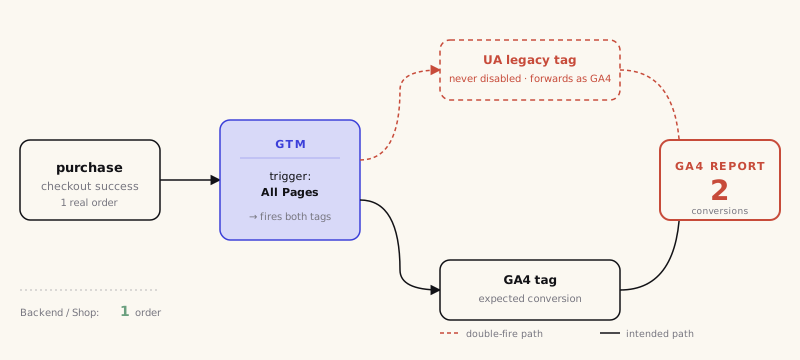
GA4 conversions are systematically higher than orders in the shop backend (Shopify, Shopware, Salesforce). Often 8 to 60 percent higher. Smart Bidding in Google Ads has been "performing strongly" for weeks, but backend ROAS feels worse than the numbers claim. Classic accompanying symptom: in GA4 DebugView a test purchase shows two purchase events within the same second, both with the same transaction_id.
Diagnosis, three checks in 15 minutes
- Backend comparison. A random week from the last 30 days. GA4 report: Advertising → Conversions → purchase. Shop backend: actual orders in the same period. Difference over 5 percent is a red flag.
- GTM tag audit. Open the container, filter all tags by "purchase" or "transaction". More than one tag per conversion platform (e.g. two for GA4, or an old UA tag plus a GA4 tag) = root cause found.
- DebugView live test. Test purchase in incognito mode, GA4 DebugView open. Exactly one
purchaseevent with the giventransaction_idshould arrive. Multiple = double-firing confirmed.
Business impact
Example calculation: a shop with 500 orders per month at €120 AOV. Double conversions mean: Google Ads counts 1,000 conversions instead of 500. Smart Bidding optimises on twice the conversion rate, holds the target CPA stable, but effectively bids double for each click. A realistic CPA of €30 silently becomes €60. With a €15,000 monthly budget, half of it lands on ads that wouldn't have seen those click prices without the measurement error.
For B2B with low volume but high ticket value, the effect is subtler, and worse: a single misattributed lead event can shift the campaign strategy for a whole quarter.
Fix
The cause is almost always one of two things: old UA tags that weren't deactivated in GTM during migration, or a purchase event that fires both from the shop's DataLayer push and from a GTM URL trigger on the thank-you page (URL triggers fire on every reload).
The solution in three steps:
- Identify all
purchasetags in GTM and reduce to exactly one per platform. - Trigger only on the DataLayer event, never on URLs.
- Lock in idempotency: every order must get a unique
transaction_id. GA4 only deduplicates within the same session, on reload the protection is gone.
For server-side setups (sGTM) the same error can happen on two layers: client GTM fires AND server GTM forwards it again. The only fix here is an end-to-end trace with request IDs.
If this check shows a discrepancy over 10 percent: pause Smart Bidding optimisations until the error is fixed. Every additional day burns budget.
#2. CRITICAL: Consent Mode V2 missing or misconfigured
Symptom
GA4 shows 30 to 50 percent fewer conversions than the shop backend. In Google Ads the conversion columns are half empty. Smart Bidding gets too little signal and pauses ads that are actually performing. In the cookie banner, Tag Assistant shows denied for ad_storage and ad_user_data, but GA4 behaves as if no default state was ever set.
Diagnosis
- Check default state in GTM. Open the container → Consent → Default settings. If no consent default tag fires before all other tags, the foundation is missing.
- Check CMP mapping. OneTrust, Cookiebot, Usercentrics, every CMP maps its own categories onto the Google consent signals. Common error:
ad_user_dataandad_personalizationaren't mapped or are mapped wrong. Check the CMP console to see whether the Google Consent Mode integration is active. - Tag Assistant live test. Reject banner → test purchase. In Tag Assistant verify that the
consentstate arrives in the GA4 and Google Ads tags. If not: the default tag isn't firing early enough. - Check the observed-vs-modeled ratio. GA4 → Advertising → Attribution → Conversion paths. If the share of modeled conversions stays above 50 percent consistently or drops below 10 percent, something's off in the Consent Mode setup. Healthy 2026 values: 15–40 percent modeled.
Business impact
A performance campaign optimising on modelled instead of observed data can run on estimates for weeks. With a healthcare brand we found multiple gaps after the Consent Mode V2 migration: no default state in GTM, OneTrust hadn't cleanly mapped ad_storage and ad_user_data onto the consent categories. For nearly two weeks the performance marketing was effectively flying blind before we slotted GTM in as a safety layer.
On top of that, the legal risk: several German data protection authorities started actively auditing Consent Mode configurations in 2025. A cookie banner that doesn't wire consent correctly is exposed, regardless of whether it looks GDPR-compliant on the surface.
Fix
Three mandatory components that have to line up:
- Default consent tag in GTM that fires before all marketing tags (trigger: Consent Initialization. All Pages). Default =
deniedfor all advertising categories. - CMP update tag: after banner interaction, the CMP sends an update to GTM that updates the consent state.
- Choose Basic or Advanced deliberately. Basic blocks Google tags without consent; Advanced can send cookieless measurements. Both can support conversion modeling with different inputs. Document the mode and assess the actual data flows.
Observed vs. modeled: Separate observed and modeled values. No universal target ratio proves a correct setup. Compare modeling eligibility, consent states and backend data for matching periods.
#3. CRITICAL: E-commerce tracking is broken after migration
Symptom
In the GA4 e-commerce report, product names are missing or weird strings appear. Conversion values are 10× too high. (Comma-vs-dot problem in the price field.) The coupon code isn't sent in the purchase event, so marketing can no longer tell whether the promo worked. Across GA4, Meta Pixel and Klaviyo, "sales" vary by several percent.
Diagnosis
- DebugView with a real test purchase. GA4 → DebugView → click through a real test purchase. Click on the
purchaseevent and inspect the items list. - Match fields against the GA4 spec. Required fields:
item_id,item_name,price,quantity. If the push hasidornamewithout prefix, GA4 won't accept it or only partially. - Platform cross-check. Open the order confirmation, identify all e-commerce tags (Network tab, filter by
collect,pixel,track). If three or more tools track the same order, do a tag-by-tag comparison of the item fields sent.
Business impact
At a retail client we took over a year ago, the order confirmation had fourteen different e-commerce tags. Universal Pixel, GA4 tag, Meta Pixel with its own item IDs, Klaviyo Pixel with yet other IDs. Every tool saw slightly different numbers. Across platforms, "sales" varied by about 8 percent. Consequence: reports to leadership were different depending on the tool source. The discussions about which number "is right" cost more time than the fix itself.
When item data is incomplete, all downstream analyses fall over too: top products, category performance, cross-sell patterns. That's the foundation for product-range decisions, when it's broken, decisions get made on gut feel instead of data.
Fix
A single unified DataLayer schema following the GA4 spec, the single source for all marketing pixels. Below the typical "before/after": on the left the broken push we regularly find in audits (required fields missing), on the right the fixed one with all GA4 spec fields.
The push is missing the GA4-required `value` and `currency` keys, and the `items` array has no required properties. GA4 accepts the event, but reports the conversion with revenue = 0. Smart Bidding has no signal to optimise on.
·dataLayer.push({·event: 'purchase',·ecommerce: {·transaction_id: 'T_12345',−// value: missing−// currency: missing·items: [{−id: 'SKU_001',−name: 'Produktname',−// price: missing−// quantity: missing·}]·}·});All marketing tags (GA4, Meta, TikTok, Klaviyo) pull their variables from exactly this push. One source, one schema, one truth. Migrating old tags onto the new schema is days of grunt work, but it clears out a whole bucket of downstream problems.
#4. HIGH: Cross-domain tracking missing or broken
Symptom
Conversion source reports show unusually high (direct) / (none), particularly for sessions that obviously originate from Google Ads. Sessions in GA4 are noticeably higher than users because the same user appears as two sessions across two domains.
With cross-domain configured, GA4 automatically appends the `_gl` linker parameter on link click. The client ID stays consistent across the domain switch.
Diagnosis
- Click through the funnel manually. From brand.com to the order confirmation on shop.brand.com. In DevTools (Network tab) check whether the
?_gl=parameter is appended to the URL on the domain switch, that's the linker. Missing it = cross-domain isn't active. - Check client ID consistency. In GA4 DebugView, compare the test user's client ID before and after the domain switch. If it changes, the linker is broken.
- Open the data stream config. Admin → Data Streams → Web → Configure tag settings → Configure your domains. Both domains must be listed explicitly. Subdomains aren't included automatically, not even checkout.brand.com.
Business impact
The user clicks a Google Ads ad onto brand.com, browses around, jumps to shop.brand.com and buys. Without cross-domain, the conversion is attributed to shop.brand.com, as (direct). The Google Ads campaign that actually started the journey gets no attribution. Smart Bidding optimises away from ads that appear not to convert, and pauses them. Real money, wrong call.
We had a retail client last summer where cross-domain had been quietly broken for a year and a half, nobody had updated the GA4 setup after the checkout provider switched to a new subdomain. Performance campaigns were being systematically undervalued.
Fix
In the GA4 property: Data Stream → Configure tag settings → Configure your domains → list every relevant domain and subdomain. With multiple data streams (e.g. Web + App), the cross-domain configuration has to be correct for each stream separately.
Important after every change to subdomains, checkout providers or payment providers: explicitly re-verify the cross-domain setup. This is the most common cause of "suddenly nothing's performing".
#5. HIGH: Enhanced Conversions not active (or empty)
Symptom
In Google Ads the Enhanced Conversions Status column says either "not activated" or "active, but under 50 % match rate". Conversion volumes look systematically too low specifically on Safari and iOS.
Diagnosis
- Google Ads → Tools → Conversions → open the single conversion action. The "Diagnosis" tab shows the match-rate status. Below 70 % = action needed.
- Check the GTM variable. In the conversion tag, look at whether the
user_dataobject is linked and whether theemail,phone_number,addressvariables are populated from the DataLayer. - DataLayer check. On the order confirmation page, open the console and dump
dataLayer. If the fields are empty or only populated after the tag fires, Enhanced Conversions runs into nothing.
Business impact
Enhanced Conversions hash email, first name, last name and send them encrypted to Google Ads, so Google can attribute the conversion to an ad, even when the cookie is long gone (Safari, iOS, adblockers). Sounds like a GDPR risk, it isn't: the data is hashed before sending, Google never sees cleartext. Correctly implemented, it's GDPR-compliant.
What it gets you: 10 to 30 percent additional conversion attribution for Google Ads. Which means 10 to 30 percent more data for Smart Bidding. Which in turn means: better delivery, lower CPA. Not magic, but real. About half of the setups we audit don't have Enhanced Conversions active at all. Another quarter has it activated but the DataLayer variables deliver empty strings, so it runs into nothing.
Fix
The prerequisite is a clean DataLayer that contains buyer data on the order confirmation. Then in GTM:
- Create variables for
user_data.email_address,user_data.phone_number,user_data.address.first_nameetc. - In the Google Ads conversion tag, link these variables in the User-provided data field.
- Important: normalise email to lowercase before hashing. This is the most common mistake, mixed-case emails don't match.
Verify in Tag Assistant: on a test conversion sha256_email, sha256_phone_number and address fields must be populated.
#6. MEDIUM: Event spam and unfiltered bot traffic
Symptom
Top sources: (direct) / (none) with conspicuously high volume. Sessions with duration = 0 are far more common than they should be, and conversion reports show purchases or lead events that never arrive in the CRM. The daily BigQuery partition grows disproportionately fast. Rows with odd event names. Or identical user-pseudo IDs.
Diagnosis
- Sort sessions by duration = 0. GA4 → Reports → Engagement → Pages and screens. A high number of zero-duration sessions on specific URLs is suspicious.
- Path anomalies. Check URLs that only DevOps or external tools would hit, health checks, status pages, pre-production URLs.
- User-agent analysis. With BigQuery export on: group by user agent. Real browser strings have characteristic patterns; crawlers and monitoring scripts stand out immediately.
- Event-count heatmap in the BigQuery export.
SELECT event_name, COUNT(*) FROM events_* GROUP BY 1 ORDER BY 2 DESC. Ifscroll,clickorpage_viewdominate the table and conversions are in the single-digit percent, the setup is running on event spam.
Business impact
GA4 filters "known bots" (Googlebot, Bingbot) automatically. What it doesn't filter: crawlers from China, SEO tools, uptime-monitor pings, test bots from your own CI systems. On smaller sites this can be 20 to 40 percent of traffic.
Worse: if a bot happens to simulate a cookie-banner acceptance, reloads the same page multiple times and then triggers an "Add to Cart" through a JavaScript trigger, it all lands in GA4 as a legitimate visit. We saw this at an insurance website where an old performance-monitoring script simulated "Request quote" every half hour. Forty percent of "conversions" were script hits. Nobody had noticed in two years.
What's added in 2026, the BigQuery cost factor. GA4 writes each event as its own row to the BigQuery export. With streaming export on and a typical e-commerce with 1M sessions/month, that's quickly 30–80M event rows per month. Bots and overpathological click/scroll tracking inflate that number by factor 3–5 without effort. At standard BQ pricing it's cents per day in storage, but every single query that a downstream dashboard or AI agent runs against that partition scans the inflated volume too. We've seen setups where 70 percent of the monthly BQ compute bill came from event spam, and the marketing team didn't even know a BigQuery export existed. Every useless scroll event gets paid for several times: once in storage, once in every model query, once in the wrong aggregate that an AI agent then trains on.
Fix
In the GA4 property under Data Stream → Configure tag settings → Define internal traffic, set filters, by user agent, IP or via custom rules. For monitoring scripts: send a custom header and add a GTM trigger block that prevents tags from firing when that header is present. Plus tighten event hygiene: scroll tracking only on the pages where it's actually needed; click events only on interactive elements, not on every wrapper div.
#7. MEDIUM: Internal traffic skews the data
Symptom
Bounce rate behaves strangely, on pages relevant to staff (careers, login, internal tools), it's conspicuously low. Heatmap tools show click patterns that don't match customer behaviour.
With an internal-traffic filter (IP list or user property), employee hits bounce off the shield. Only real visitor sessions enter the GA4 property.
Diagnosis
- Check the internal-traffic filter. Admin → Data Streams → Web → Configure tag settings → Define internal traffic. Are the IPs current? Do they cover the marketing team's home office too?
- Office IP cross-check. Browse from the office for an hour, then check DebugView whether these sessions arrive marked as "internal".
- External-service-provider hits. Collect IPs from external providers and reconcile against the filters.
Business impact
For smaller sites with 5,000 visitors per month, this is fatal. 200 internal hits per day = 6,000 per month. The traffic curve becomes a caricature, bounce-rate values become useless, heatmap tools show click patterns that don't come from real customers. On larger sites the effect disappears into the noise, but GA4's conversion rate is still skewed, because internal testers rarely buy.
Fix
User properties instead of IP filters (safer, because home-office IPs change all the time): set a cookie or LocalStorage value flagging the employee, read it as a GTM variable, send it to GA4 as a user property. Filterable in the report, and at the same time excludable from reporting entirely via setting. Plus: a dedicated test data stream for QA that doesn't flow into the main reporting. Three days of work, pays off for years.
Self-audit in 30 minutes
Three checks you can run yourself this afternoon:
- [ ] Backend diff (Error #1): GA4 conversions vs. shop orders, one week, diff over 5 percent?
- [ ] DebugView e-commerce (Error #3): test purchase in incognito mode, check the
purchaseevent items, all fields populated (item_id,item_name,price,quantity)? - [ ] Cross-domain linker (Error #4): click through the funnel manually, watch for the
?_gl=parameter on the domain switch?
If one of those falls out: you have a marker for what's costing money over the coming weeks. The harder things. Consent Mode config in detail, cross-domain with multiple subdomains, server-side setup, Enhanced Conversions correctly wired, BigQuery schema sanity, don't get done in 30 minutes.
What it costs to do nothing
If you've read this far, you've probably nodded at at least two of the seven errors. That's statistically normal. The uncomfortable news: every day a critical error keeps running is a day the marketing team is making decisions on broken data. With performance marketing this adds up fast, not in dramatic line items, but in chronically bad budget allocation that nobody attributes directly.
The cost chain got longer in 2026. The GA4 BigQuery export feeds Data (Looker) Studio dashboards, MMM models, customer data platforms and, increasingly. AI agents that suggest actions to the marketing team ("pause campaign X", "raise budget on Y"). Garbage in, garbage out still holds, except the garbage now propagates through three downstream models before landing as an "insight" on the manager dashboard. Anyone investing in first-party-data AI in 2026 without first auditing the data layer is building a recommendation system that confidently delivers wrong answers. An audit, in this setup, is no longer optional hygiene; it's the prerequisite for the downstream AI investments to make sense at all.
Our audit sprint:
Audit Sprint: €1,490 net, report in 3 working days. One website, one GA4 property, one web GTM container, one CMP, one ads account and up to three conversion paths. Evidence, action plan and a 45-minute review. From the agreed start with complete access and documents. Scope and delivery date are agreed before commissioning. Implementation is separate, with no follow-up obligation.
Audit Sprint Plus: from €2,900 net, report in 5–7 working days. One brand, up to two domains and GA4 properties, one web and one server GTM container, one CMP, two ads platforms and five conversion paths; one existing shop or CRM export. Evidence, action plan and a 60-minute review. From the agreed start with complete access and documents. Scope and delivery date are agreed before commissioning. Implementation is separate, with no follow-up obligation.
More on the methodology on the Measurement & Privacy Engineering service page.
For consent findings, use the Basic/Advanced guide and consent mapping worksheet. For Shopify, the implementation guide covers events and deduplication.