
This article is for technical and operational guidance only and is not legal advice. Privacy and consent requirements should be reviewed with qualified legal counsel.
Update July 2026: four weeks after the change we collected the patterns from the first audits: three findings from DACH audits.
What changed on June 15, 2026?
Google updated how data controls work for linked Google Analytics and Google Ads setups. The headline change: Google Analytics is transitioning to Consent Mode (within Google Ads) as the single control for the relevant Google Ads data collection. Google describes this as streamlining the consent process so user preferences are enforced consistently between Google Analytics and Google Ads.
Concretely, three things are moving:
- Google Signals. From June 15, 2026, the Google Signals setting no longer controls Google Ads cookie collection. That collection is now governed by users' privacy choices through Ads Consent Mode. Google Signals continues to control only the association of GA-sourced data with signed-in user information for behavioral reporting.
- Ads personalization (later in 2026). Google has announced that the Consent Mode
ad_personalizationsetting will exclusively control whether linked data is used for personalization in your Ads account. The exact date is to be announced. - IP addresses. Encrypted IP addresses automatically collected will flow to linked Google Ads accounts and be controlled by, and used in accordance with, your Google Ads settings.
The throughline: for linked properties, Google Ads settings govern Google Ads data, while Google Analytics settings increasingly govern only the data used within Analytics for behavioral reporting.
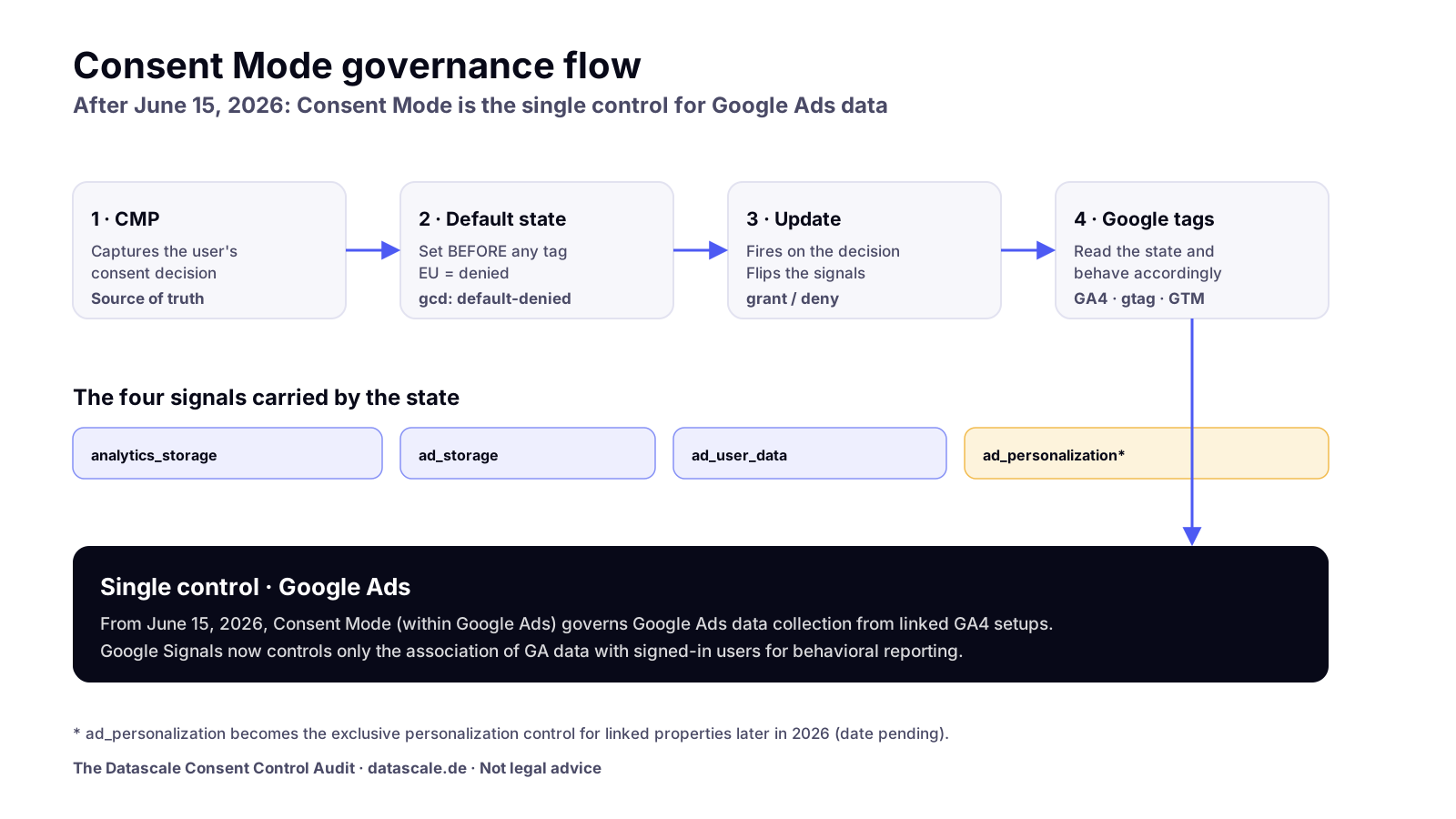
Before vs after June 15, 2026
| Aspect | Before June 15, 2026 | After June 15, 2026 |
|---|---|---|
| Control over Google Ads data collection (linked setups) | Shaped by GA-side controls incl. Google Signals | Consent Mode (within Google Ads) is the single control |
| Role of Google Signals | Influenced Google Ads cookie collection | Controls only association of GA data with signed-in users for behavioral reporting |
| Ads personalization use (linked) | Mixed/legacy controls | Moving to ad_personalization as the exclusive control (later in 2026) |
| Where teams should look first | GA4 admin settings | Consent Mode implementation (banner → defaults → updates → tags) |
| Primary failure symptom | "Compliance setting wrong" | Compliance and measurement loss: conversions, audiences, modeling |
This change does not remove all GA4 controls, does not automatically make any prior setup illegal, and does not mean Consent Mode by itself satisfies GDPR. It changes which control governs Google Ads data, and raises the stakes on getting Consent Mode right.
Why this became the most discussed analytics topic in June 2026
Because it quietly relocates accountability. For years the mental model was "manage the GA4 settings, link to Ads, done." The June 2026 change makes the signal layer (Consent Mode) the thing that decides what Google Ads can collect and use. That has four consequences teams felt at once:
- It's a measurement story, not only a privacy story. A weak Consent Mode implementation now directly shrinks what Ads receives.
- It crosses team boundaries. Marketing owns outcomes, engineering owns the tag layer, the CMP vendor owns the banner, legal owns the consent policy, and the change touches all of them.
- The symptoms are easy to misread. Fewer conversions look like a campaign problem; smaller audiences look like seasonality. The root cause may be a default consent state or a missing update call.
- It rewards teams that already documented their setup and punishes those who assumed "Consent Mode is enabled" without verifying behavior.
What this means for GA4
GA4 remains your analytics platform; behavioral reporting controls still live in Analytics. What changes is the boundary: for linked properties, GA-side settings no longer govern Google Ads data collection, Consent Mode does.
- Google Signals is now a reporting-association control, not a Google-Ads data switch. Re-read your Admin settings with that framing.
- Consent state quality flows downstream. If
analytics_storageand the ad signals aren't transmitted correctly, GA4 modeling and the Ads handoff both suffer. - Verify your GA4 consent settings reflect the new model, and watch consent-mode impact reporting to understand how much data is modeled vs observed.
What this means for Google Ads
Google Ads is now the side that governs the data it receives from linked GA setups, through Consent Mode.
- Conversion measurement depends on the ad consent signals (
ad_storage,ad_user_data). If those are denied or never updated after consent, conversions go unobserved and modeling has less to work with. - Audiences and remarketing depend on consent too. Smaller or stale audiences often trace back to consent transmission, not list configuration.
- Personalization is moving to
ad_personalizationas the exclusive control (later in 2026). Confirm your tagging sets that signal intentionally. - Smart Bidding learns on whatever signal it gets. A holed signal raises cost-per-acquisition quietly, the most expensive way to discover a Consent Mode bug.
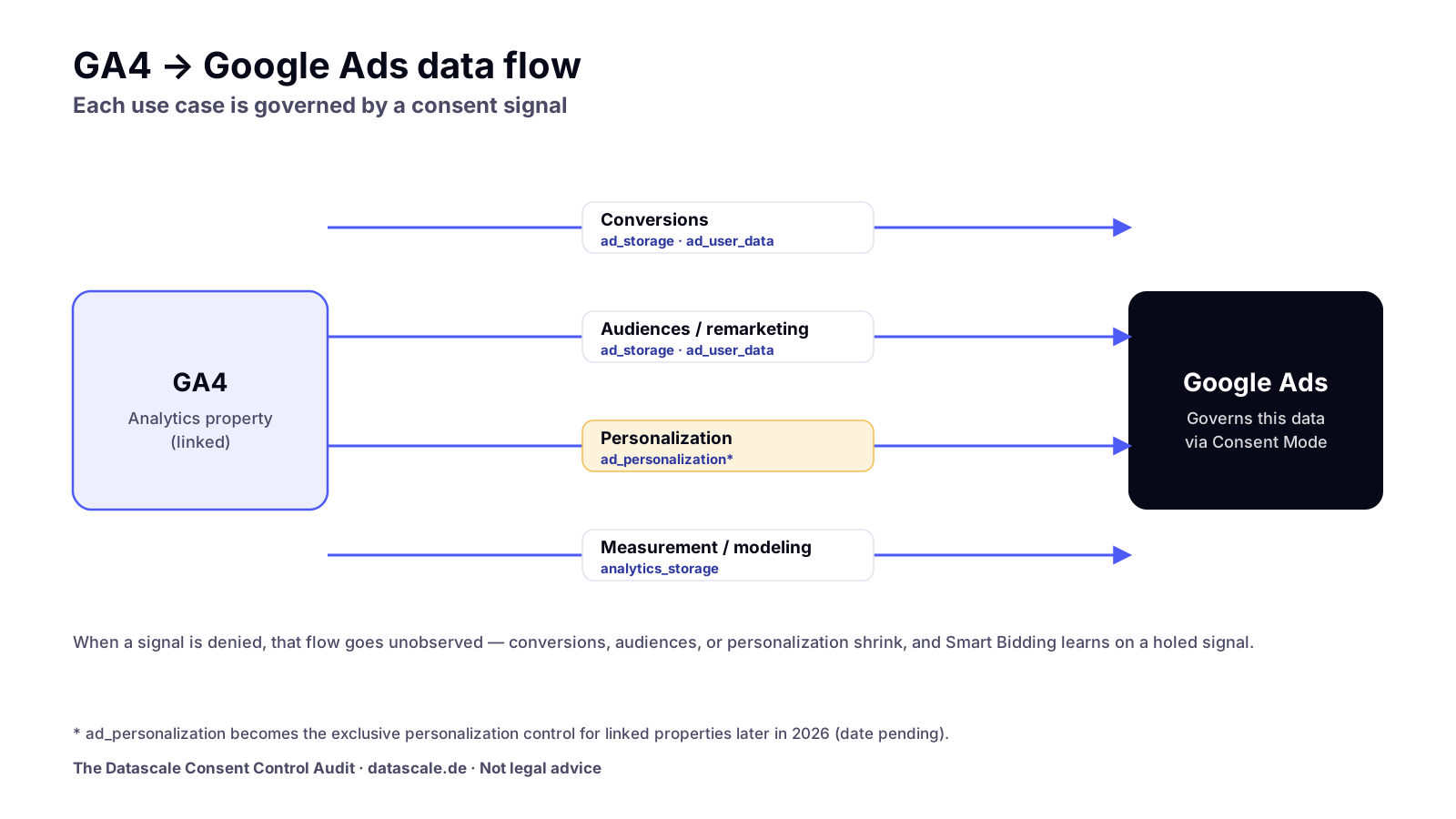
Affected systems and teams
| System / surface | What's affected | Most-affected team |
|---|---|---|
| GA4 property (linked) | Boundary of what flows to Ads; reporting-association via Google Signals | Analytics |
| Google Ads account | Data collection/use now governed by Consent Mode | Performance marketing |
| Consent Mode signals | ad_storage, analytics_storage, ad_user_data, ad_personalization | Engineering + Analytics |
| CMP / consent banner | Whether consent is captured and passed correctly | Marketing + CMP vendor + Legal |
| Google Tag / GTM (web) | Default + update consent wiring | Engineering |
| Server-side GTM | Server-side consent state and forwarding | Engineering / Data |
| BigQuery export & reporting | Downstream consistency and documentation | Data / BI |
What this means for Consent Mode and CMPs
Consent Mode is the signaling layer between your CMP and Google. It is not a cookie banner and not a compliance product, it transmits a consent state (the four signals) to Google tags so they adjust behavior. After June 2026, the quality of that transmission is what governs Google Ads data collection.
A correct chain looks like this:
- The CMP captures the user's consent decision (the source of truth).
- A default consent state is set before any Google tag fires (typically denied for EU users until a choice is made).
- On the user's decision, an update call adjusts the signals.
- Google tags read the state and behave accordingly.
If any link is missing (default set too late, update never fired, CMP not wired to Consent Mode) the signal is wrong and the new single control receives the wrong input.
Consent parameters to check
| Parameter | Governs | Typical EU default | Why it matters now |
|---|---|---|---|
analytics_storage | Analytics cookies/storage | denied until consent | Drives GA4 measurement + modeling input |
ad_storage | Advertising cookies/storage | denied until consent | Core to Google Ads conversion observation |
ad_user_data | Sending user data to Google for ads | denied until consent | Required signal for ads data use |
ad_personalization | Use of data for ads personalization | denied until consent | Becomes the exclusive personalization control (later in 2026) |
The CMP owns the decision; Consent Mode transmits it. Both are needed, one without the other leaves the new single control reading an empty or wrong signal. (See our deeper explainer on how Consent Mode V2 works in practice.)
What this means for DACH companies
DACH teams operate under GDPR and active DPA scrutiny, so they tend to run denied-by-default consent and depend on modeling to recover unobserved conversions. That makes them more exposed to the June 2026 change, not less:
- A larger share of traffic sits in the denied/consent-pending state, so the accuracy of the default and update signals matters more.
- Server-side tagging is common in DACH for data minimization; the server-side consent state must be correct too, not just the client-side banner.
- Reporting is often shared with finance and leadership, so inconsistencies are visible and erode trust quickly.
- Privacy/legal teams should review consent policy and CMP configuration with qualified counsel; this article does not substitute for that review. (Background: GDPR-compliant analytics.)
Common failure modes
| Failure mode | What it looks like | Likely root cause |
|---|---|---|
| Default set too late | Tags fire before a consent state exists (SPA race condition) | default snippet loads after the tag library |
| Update never fires | Consent accepted, but signals stay denied | CMP not wired to a Consent Mode update call |
| CMP "enabled" but not processed | Banner shows; tags ignore the state | Consent Mode template not connected to the CMP |
| Ad signals omitted | analytics_storage set, but ad_user_data / ad_personalization missing | Partial template using v1-era signals |
| Server-side mismatch | Client says granted, server forwards as denied (or vice versa) | sGTM not reading/propagating consent state |
| Still relying on GA-side switch | Assuming Google Signals controls Ads data | Mental model not updated for June 2026 |
| Undocumented setup | Nobody can say who owns the consent chain | No governance/owner mapping |
(For the GA4-specific version of these, see common GA4 audit errors.)
The Datascale Consent Control Audit
Use this 7-layer model to review a setup end to end. It maps each layer to what to check, why it matters, failure signals, validation method, and owner, so accountability is explicit, not assumed.
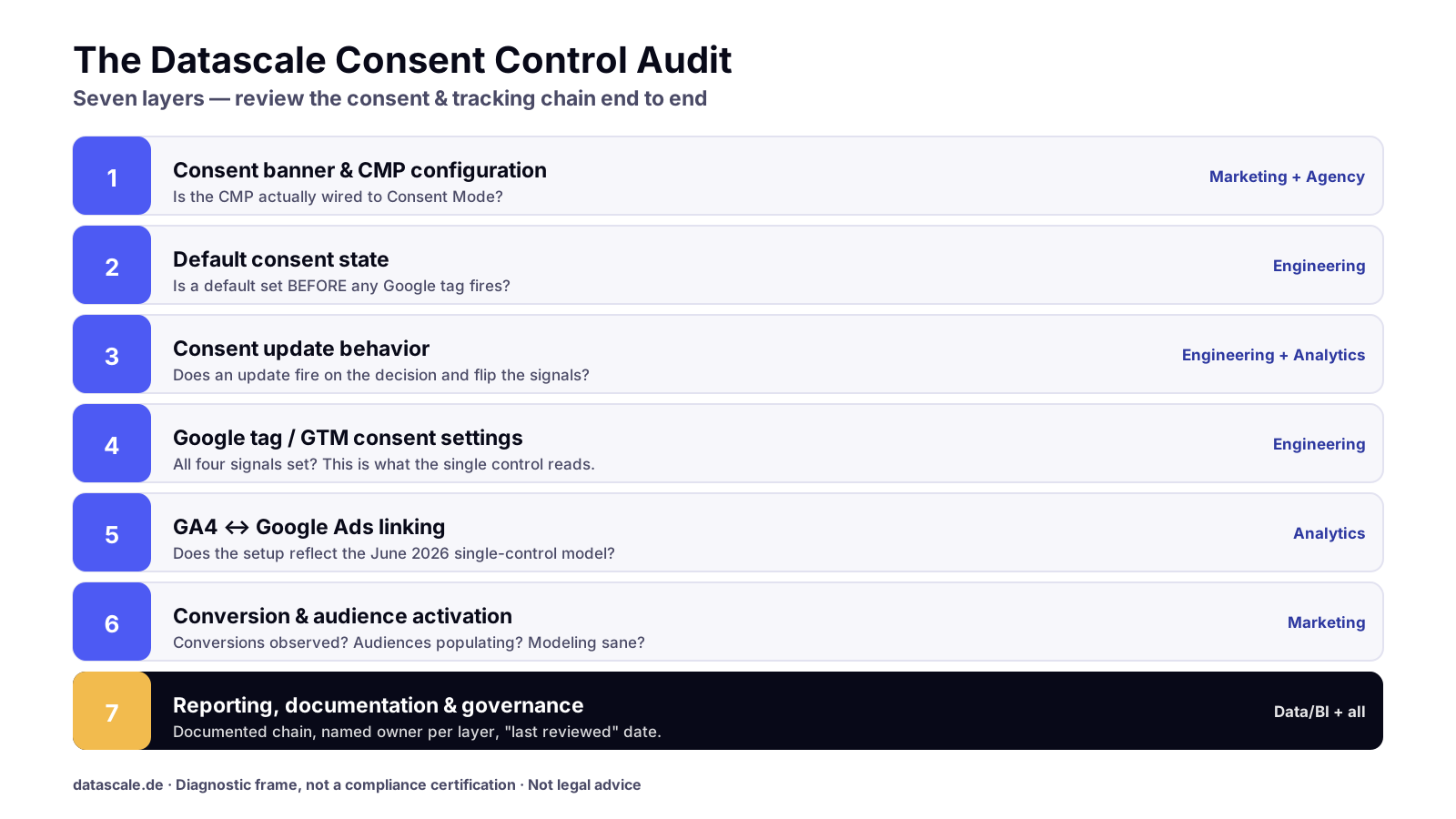
| # | Layer | What to check | Why it matters | Failure signals | Validation method | Owner |
|---|---|---|---|---|---|---|
| 1 | Consent banner & CMP configuration | Banner captures a clear granted/denied decision; CMP is wired to Consent Mode | The CMP is the source of truth for the signal | Banner present but tags unaffected; no template link | CMP debug view + tag-firing test on accept/reject | Marketing + CMP vendor |
| 2 | Default consent state | A default state is set before any Google tag fires | Wrong/late default poisons everything downstream | Tags fire pre-consent; SPA race condition | Inspect load order; gcd parameter in network calls | Engineering |
| 3 | Consent update behavior | An update call fires on the user's decision and changes signals | Without it, granted users stay denied | Conversions/audiences flat after accept | Compare signals before/after consent action | Engineering + Analytics |
| 4 | Google tag / GTM consent settings | All four signals set correctly; built-in consent checks configured | This is the signal the new single control reads | Missing ad_user_data / ad_personalization | GTM consent overview; Tag Assistant | Engineering |
| 5 | GA4 ↔ Google Ads linking | Link is active; expectations align with the June 2026 model | Determines what governs Ads data now | Reliance on Google Signals as the Ads switch | GA4 Admin link review; consent settings check | Analytics |
| 6 | Conversion & audience activation | Conversions observed, audiences populating, modeling sane | Where measurement loss actually surfaces | Conversion/audience drops without campaign change | Ads diagnostics; consent-mode impact report | Performance marketing |
| 7 | Reporting, documentation & governance | Setup documented; owner named per layer; "last reviewed" date kept | Prevents drift and finger-pointing | Nobody can explain the chain | Audit doc + owner map review | Data/BI + all |
The Datascale Consent Control Audit is a diagnostic frame, not a compliance certification. It tells you where a setup is fragile and who should fix it.
Use the checklist to review your Consent Mode implementation layer by layer. Download the June 2026 Consent Mode Audit Checklist, a PDF + Google Sheet covering all seven layers. (soft gate, not a wall)
Consent Mode June 2026 Audit Checklist (PDF + Google Sheet)
The 7-layer checklist for your GA4 and Google Ads Consent Mode setup after June 15, 2026. Each layer: what to check, failure signal, validation, owner. Enter your work email and we send the PDF and Sheet. GDPR-clean, no third-country transfer.
By submitting you accept our privacy policy. No tracking pixel in the email, no third-country transfer.
Audit checklist
A condensed pass you can run this week:
- Re-read GA4 Admin with the new model in mind, treat Google Signals as a reporting-association control, not the Ads data switch.
- Confirm a default consent state is set before any Google tag fires.
- Confirm an update call fires on accept and changes the signals.
- Verify all four signals:
analytics_storage,ad_storage,ad_user_data,ad_personalization. - Confirm the CMP is actually wired to Consent Mode (not just present).
- Check the server-side consent state if you run sGTM.
- Review GA4 ↔ Google Ads linking and consent settings.
- Check conversions, audiences, and modeling for unexplained drops.
- Document the chain and assign an owner per layer.
- Schedule a "last reviewed" date and re-audit cadence.
How to verify your setup
Verification is behavioral: change consent and watch the signal change.
- Inspect the consent state in network calls. Use Google's verification guidance and the
gcdparameter to confirm default and update behavior. - Test accept and reject paths. On reject, advertising signals should remain
denied; on accept, they should flip togranted. - Use Tag Assistant / the GTM consent overview to confirm every relevant tag respects the state.
- Troubleshoot anomalies with Google's checklist when signals don't behave.
- Confirm GA4 consent settings reflect the current model.
- Read the impact report to see how much is observed vs modeled.
You can also estimate what your consent gap costs before you start, and run a measurement health check for a quick baseline.
CMP & GTM Consent QA Template
The repeatable test plan for default-denied states, consent updates, and tag firing across all four signals. QA spreadsheet plus implementation notes. Enter your work email and we send the files.
By submitting you accept our privacy policy. No tracking pixel in the email, no third-country transfer.
What to document internally
Documentation is layer 7 for a reason: this change crosses teams, and ambiguity is the real risk. Capture, in one place: the consent chain (banner → default → update → tags → linking → activation), the current value of each of the four signals for EU/non-EU defaults, the GA4 ↔ Ads link status, and a named owner per layer with a "last reviewed" date.
Who owns what
| Team | Owns | Should verify after June 2026 |
|---|---|---|
| Marketing | Consent UX, campaign outcomes, CTA flows | Banner captures decisions; conversions/audiences stable |
| Analytics | GA4 config, linking, consent settings | Google Signals understood as reporting-association; signals correct |
| Legal / privacy | Consent policy, lawful basis, CMP policy | Policy reviewed with counsel; CMP config matches policy |
| Engineering | Tag layer, defaults, updates, sGTM | Default-before-tags; update fires; four signals set |
| Data / BI | Reporting, BigQuery export, governance | Consistency, documentation, owner map current |
| Agency / partner | Implementation & validation support | End-to-end validation; handover doc delivered |
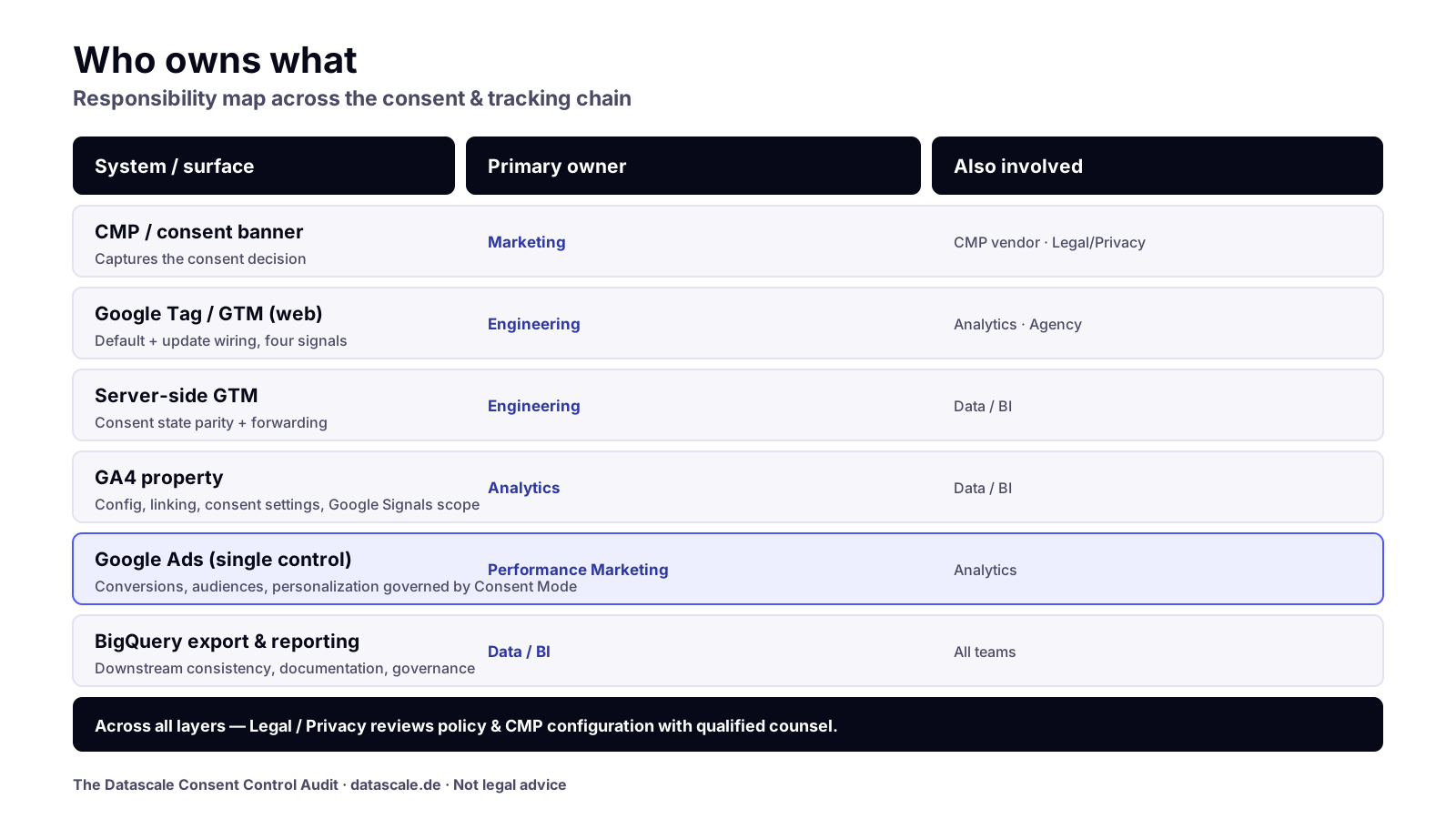
What to do next
- Run the 7-layer audit above (or the downloadable checklist) within the next sprint.
- Fix the signal chain first (default, update, four signals) because that's what the new single control reads.
- Re-check Ads measurement after fixes; watch conversions, audiences, modeling.
- Document and assign owners, set a re-audit date.
- Have privacy/legal review the policy and CMP configuration with qualified counsel.
Need a second pair of eyes?
Datascale is a Marketing Engineering partner. We audit and validate Consent Mode behavior across GA4, Google Ads, GTM, CMPs, and server-side tagging, and connect tracking, consent, data quality, reporting, and activation so your measurement is reliable and your governance is clear.
- Book a Measurement & Consent Audit Sprint: fixed-scope audit, prioritized action plan.
- Prefer to start by mapping flows? Map your GA4 and Google Ads consent flows.
GA4 & Google Ads Consent Mapping Worksheet
The template to document which data flows from GA4 to Google Ads and which consent signal governs each use case. Pre-filled with the most common flows. Enter your work email and we send the Google Sheet and XLSX.
By submitting you accept our privacy policy. No tracking pixel in the email, no third-country transfer.
Official sources
- Updates to Google Analytics Data Controls
- About consent mode
- Set up consent mode
- Consent mode reference
- Verify consent mode implementation
- Troubleshoot consent mode
- About consent mode impact results
- Verify and update consent settings in Google Analytics
Disclaimer: This article is for technical and operational guidance only and is not legal advice. Privacy and consent requirements should be reviewed with qualified legal counsel. Product names and behaviors reflect Google's documentation as of the last-reviewed date and may change; verify against the official sources above.